BizNii for Odoo app logo
BizNii for Odoo

NATIVE ANDROID · ODOO 14–20

Business,
wherever
you are.

The customer visit. The next quotation. The job that needs finishing. Bring your Odoo workspace with you, in one focused Android app.

72-hour free trial · No automatic charge

Odoo 14–20Android 8.0+Lifetime access
YOUR WORK. CONNECTED.
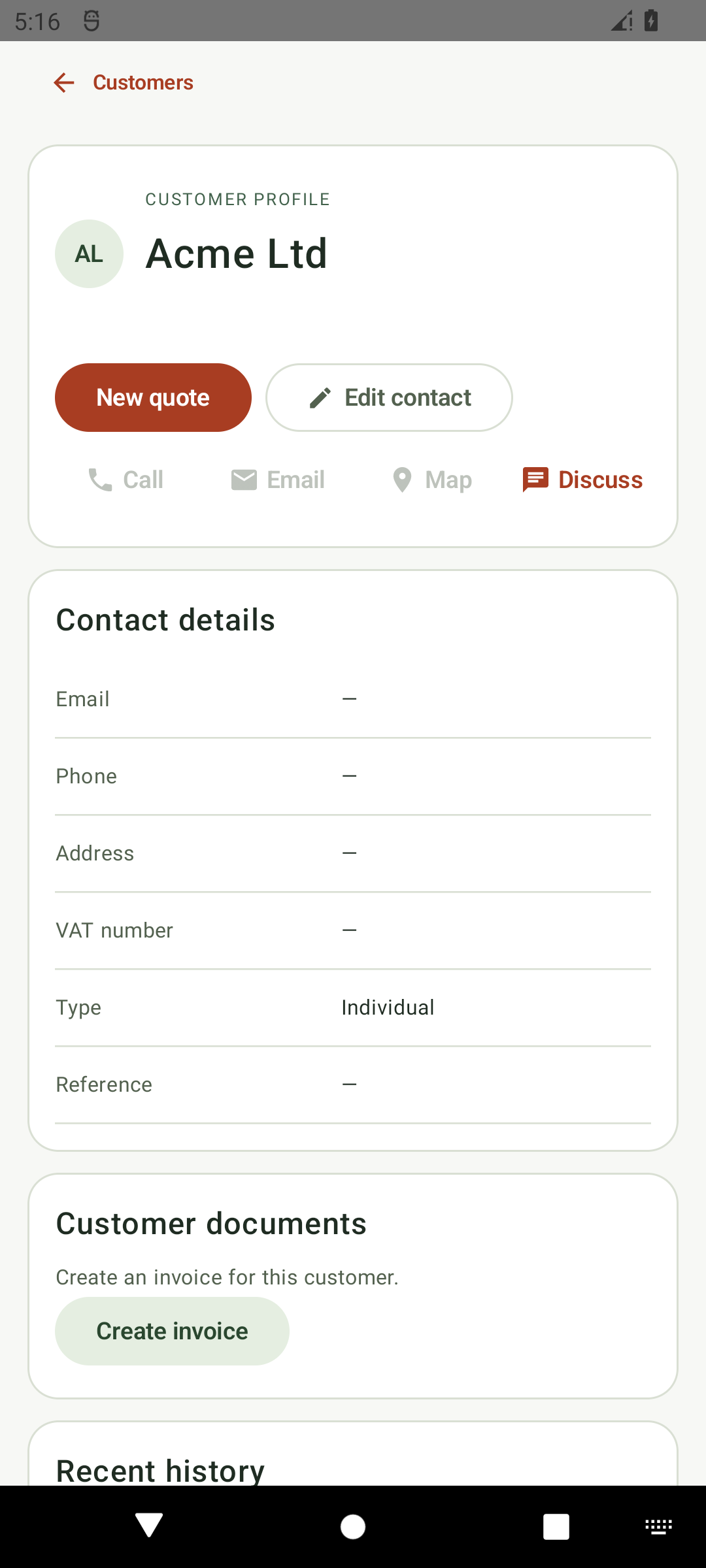
BizNii customer profile with quotation, invoice and discussion actions, for Acme Ltd
Customer → quotation
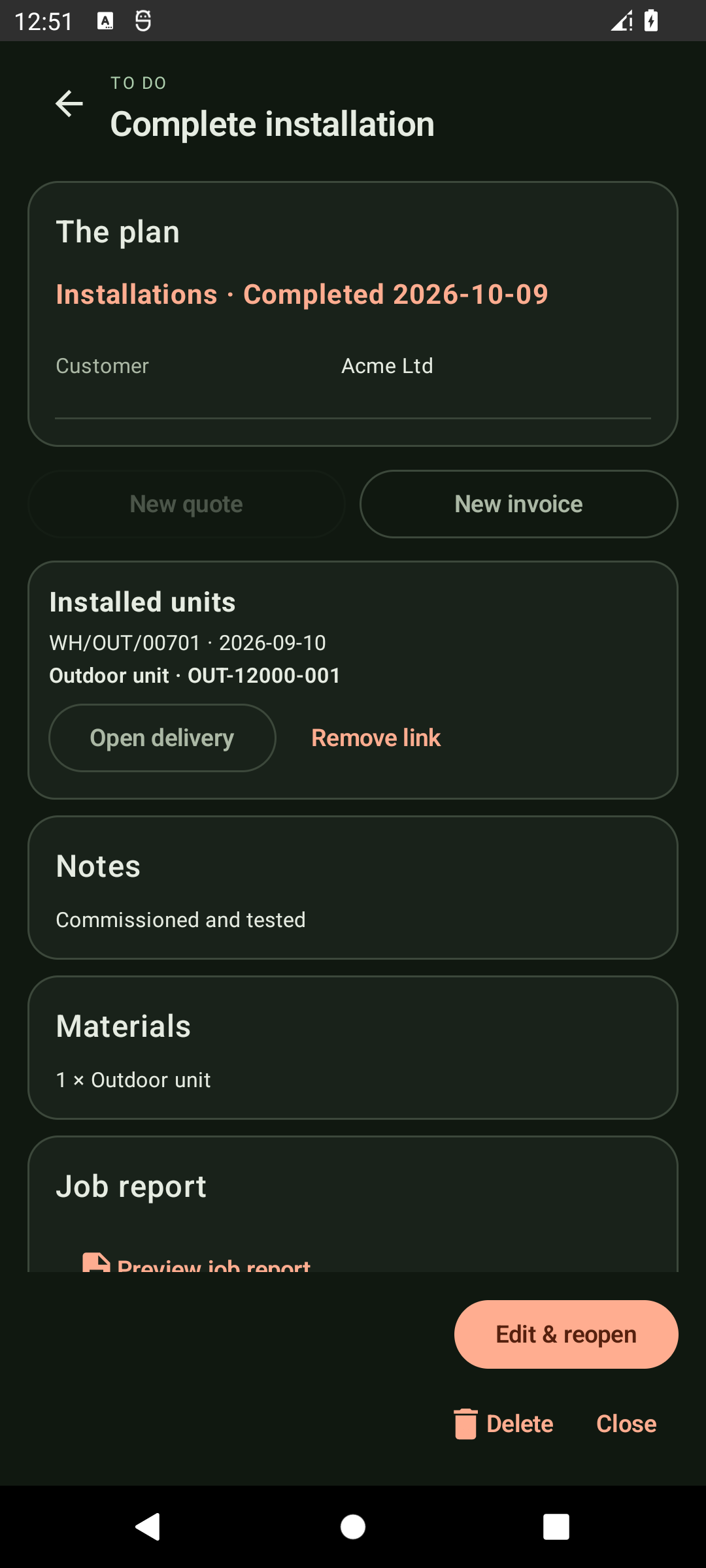
Completed installation with linked delivery, materials, notes and job report in the Android app
Visit → completed job
From office to on site.Keep the whole job in context.

Your workspace, wherever you go.

Customers & salesTasks & calendarMoney & stockField work & team

01 / YOUR DAILY WORKSPACE

One business.
Every moving part.

Start with the overview. Move between To Do, Sales, Money and More. Your Odoo permissions and selected company shape the tools you see.

02 / CUSTOMERS & SALES

A conversation.
A quote.
A next step.

Open a customer and see the context that matters. Turn an enquiry into a quotation, a sales order and a draft invoice through Odoo’s standard workflow.

Customer relationships

Search, create and edit contacts and addresses. Call, compose an email, map the address or open the shared discussion. Explore the customer’s To Dos, quotations, sales orders and invoice history, plus photos and documents.


Quotations & sales orders

Edit draft lines with company pricelists, quantity-aware pricing and permission-aware margins. Confirm orders, review cancellation consequences and restore cancelled documents to draft.

Products & pricing

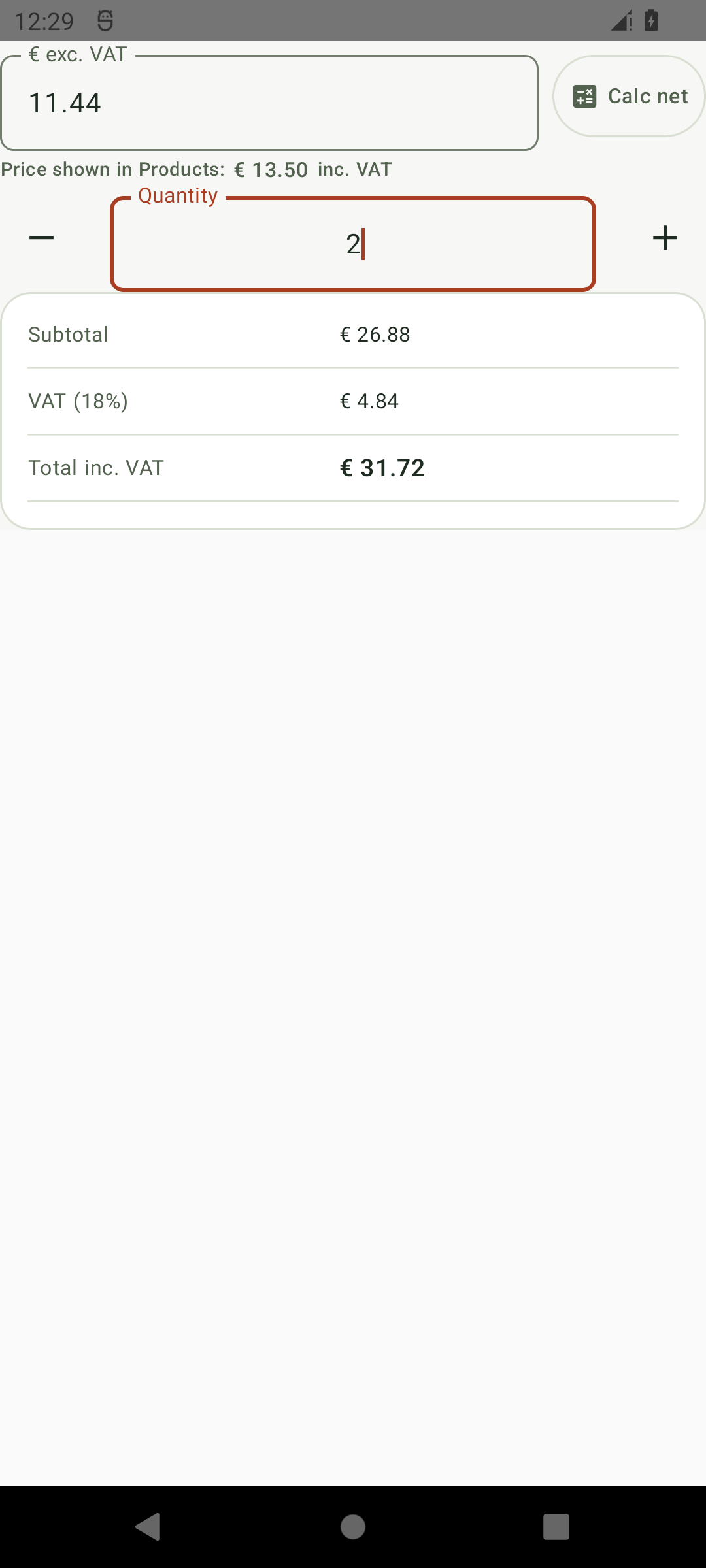
See prices and available stock. Create and edit single-variant products. Use Calc net with actual Odoo tax rules, clear totals and price references in quotation and invoice editors.

Explore every sales feature ↗
Acme Ltd customer profile in BizNii for Odoo
CUSTOMER RELATIONSHIPS

The customer profile connects contact details, business documents and history.

03 / PLAN IT. DO IT. FINISH IT.

Your day has a lot going on.
Keep it together.

TO DO & CALENDAR

Give every task
its time and place.

Create, edit, schedule, complete and reopen Odoo activities. Find today’s work, overdue tasks and completed jobs. Link a customer and start a prefilled quote or invoice directly from the task.
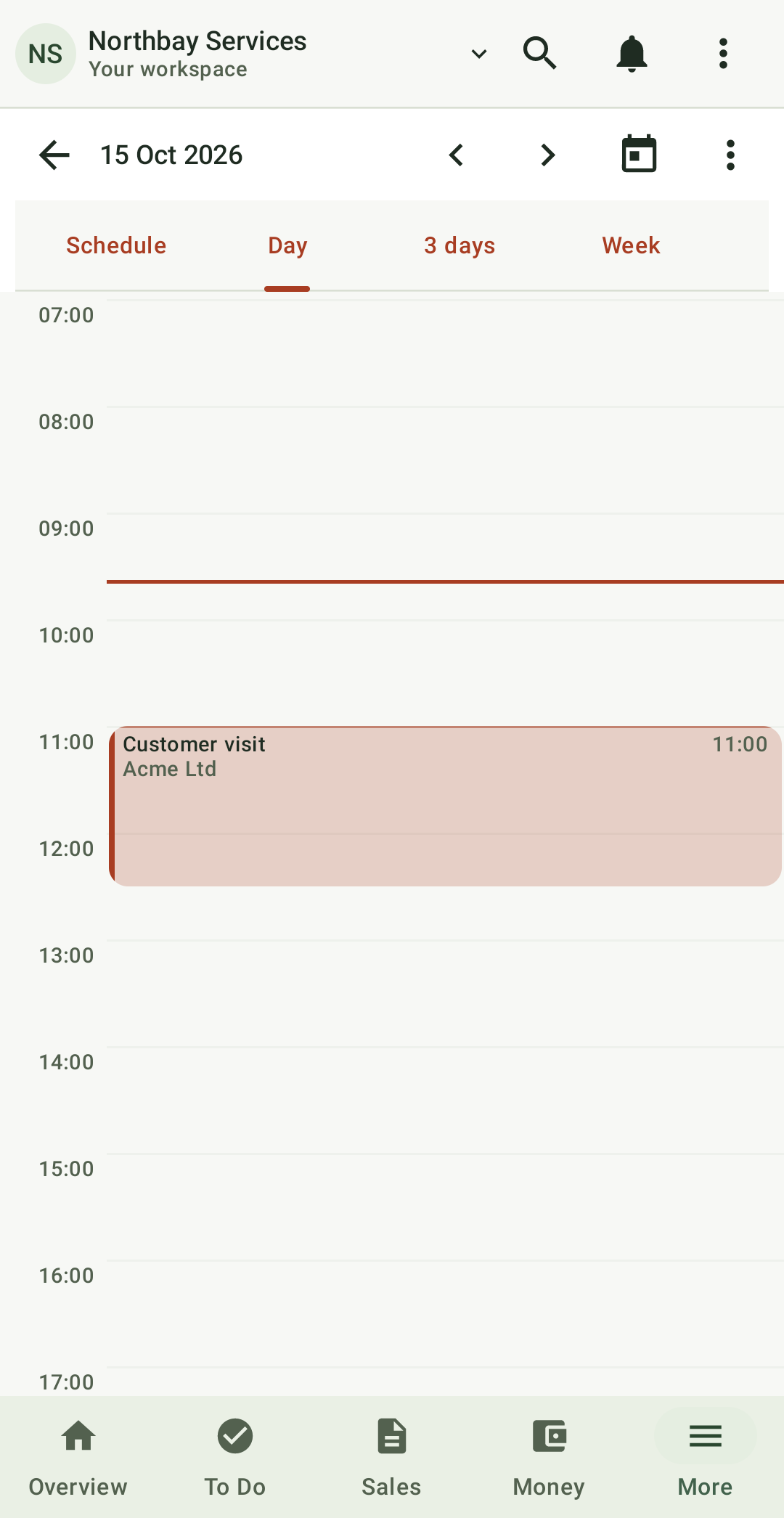
  • Schedule, Day, 3-day, Week and Month views
  • Hourly grids, all-day lanes and true-duration task blocks
  • 15-minute drag and resize, including dragging into the next day
  • Overlap warnings, working hours and unscheduled-task tray
  • Recurring events, calendar copy/move and bulk date changes
  • Completed-task search, feedback and reviewed bulk deletion
All planning features ↗
Native calendar day view showing a customer visit and pending work with scheduled tasks
Your day, clearly planned
FIELD WORK

The job is more
than an appointment.

Carry materials, travel buffers and installation checklists with the task. Capture job photos, signatures and documents. Share a job-report PDF and hand the ordered appointments to your maps app.

Job reportsSignaturesChecklistsWarranty lookupVan stock

Repeat tasks advance when you complete them in BizNii.

04 / MONEY & OPERATIONS

See what’s due.
Know what’s in stock.

Follow the business from the first order to the delivery, invoice and payment. Review consequential actions before they reach Odoo.

Invoices & payments

Create and edit draft invoices with dates, references, customer and product lines, taxes and prices. Review before posting. Register payments through the configured bank/cash journal; create credit notes as drafts for review.

Invoice features ↗

Accounting & reports

Explore receivables and payables in current, 1–30, 31–60, 61–90 and 91+ day buckets. Share branded, paginated customer statements and calendar-year P&L, bank/cash and VAT summaries. Prepare payment reminders in your mail app.

Reporting scope ↗

Inventory & transfers

Check on-hand, forecast, incoming, outgoing and low stock. Look up barcodes with a camera or hardware scanner. Reserve deliveries and complete supported transfers, tracked receipts, serial adjustments and stock counts.

Inventory features ↗

Purchasing & suppliers

Search suppliers, edit draft RFQs, review purchase orders, arrivals and vendor references. Confirm within Odoo approval rules, cancel or restore eligible drafts, share PDFs and prepare vendor bills for eligible quantities.

Purchasing features ↗
Also on the road

Per-location van stock shows on-hand, reserved and available quantities. Send replenishment deficits into a reviewed draft RFQ. Look up serial-number warranties and share local certificates with unknown expiry shown clearly.
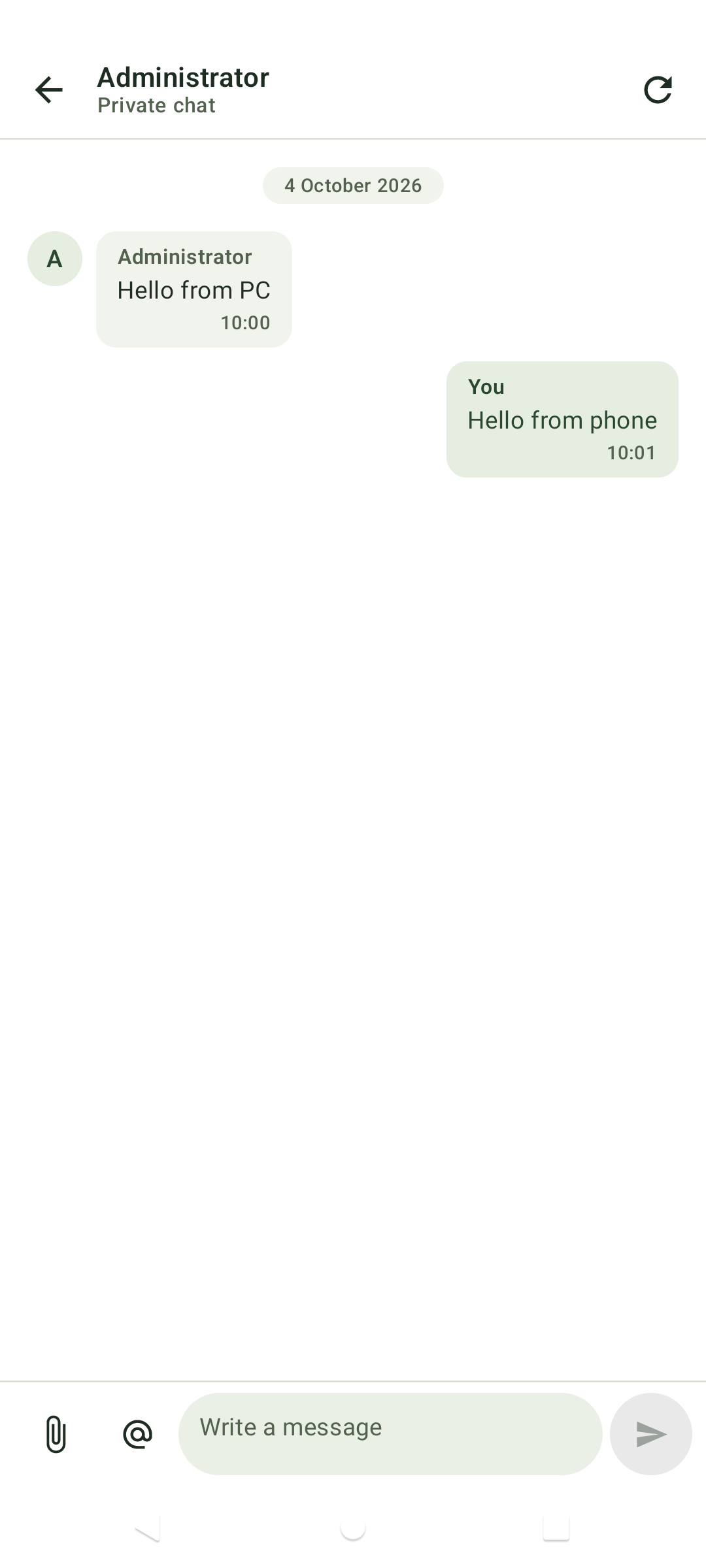
Native Odoo private chat showing an exchange between PC and phone
NATIVE ODOO DISCUSSION

The same conversation, carried with you.

05 / TEAM, WIDGETS & REMINDERS

Keep the conversation
with the work.

Direct chats, groups & record discussions

Start native Odoo direct or group chats, mention internal users, and attach photos or files. Open shared business-record discussions from a familiar message box. Inbox, Mentions and unread state help you find what needs attention.

Your Android home screen

An adaptive full-month activity widget includes task colours, completed work, overdue styling, pending summaries and date shortcuts. The Discussion widget brings All, Inbox and Mentions to the home screen with refresh and shortcuts to your conversations.

Reminders with context

Opt into appointment warnings, due-today reminders and overdue digests every 6 or 12 hours. Use Settings → Notifications → Show overdue summary now to request an expandable summary from the current workspace’s saved tasks. Low-stock and overdue-invoice alerts are also optional. Appointment reminders follow your Android notification and alarm settings. Expand an overdue notification to see available task details; Android may initially show only the count. Business alerts show counts, and lock-screen public content is redacted.

Sending private messages requires a connection. Background message checks run periodically and may be delayed by Android battery settings.

YOUR WORKSPACE, AT YOUR FINGERTIPS

A little less tapping.
A lot more doing.

Overview, To Do, Sales, Money and More. Your everyday Odoo work, organised around the way you use it.

Tap the tabs, cards and highlighted actions to explore the app with sample data.

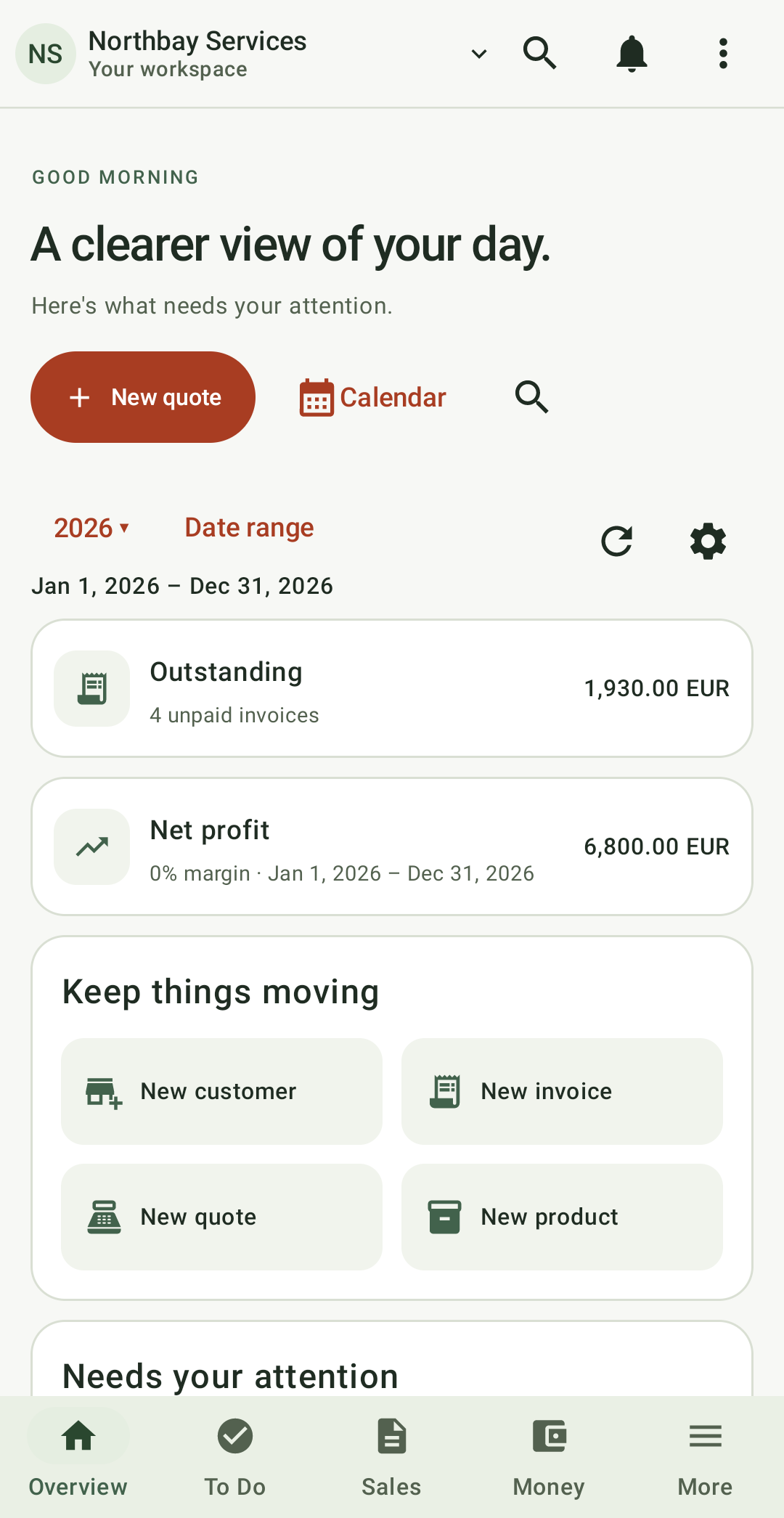
Your business overview

Follow outstanding invoices, financial summaries and your next actions in one place.
Find your workflow ↗
BizNii for Odoo Overview workspace
Overview

YOUR ANDROID HOME SCREEN

Useful information before you even open the app.

Move through the months, open a day’s work or follow a conversation. Your next action is always close.

YOUR DAY

○ Open◷ Overdue✓ Completed

Discuss

Northbay Services

2

Explore with sample tasks and conversations. Changes stay in this page.

Your whole month

Five or six weeks, with task colours, completed work and a pending summary on today.

From date to action

Select a day to explore its agenda, open a task, or add a quick note.

Keep the conversation going

Filter unread messages and mentions, open a conversation and try a reply.

Add a quick note

This adds a sample task to the calendar on this page.

06 / INSIDE THE APP

See the details.
Watch the flow.

See your calendar, job details, offline tasks and pricing up close. Keep conversations connected as you move between your desk and your phone.

KEEP THE CONVERSATION GOING

From a PC message to a phone reply.

Read a message, send your reply and keep your team moving. Native Odoo conversations travel with your work.

Calendar showing a scheduled customer visitView screenshot ↗
Plan the visitNative hourly calendar
Completed installation task with delivery link and job evidenceView screenshot ↗
Finish the jobMaterials, delivery & job report
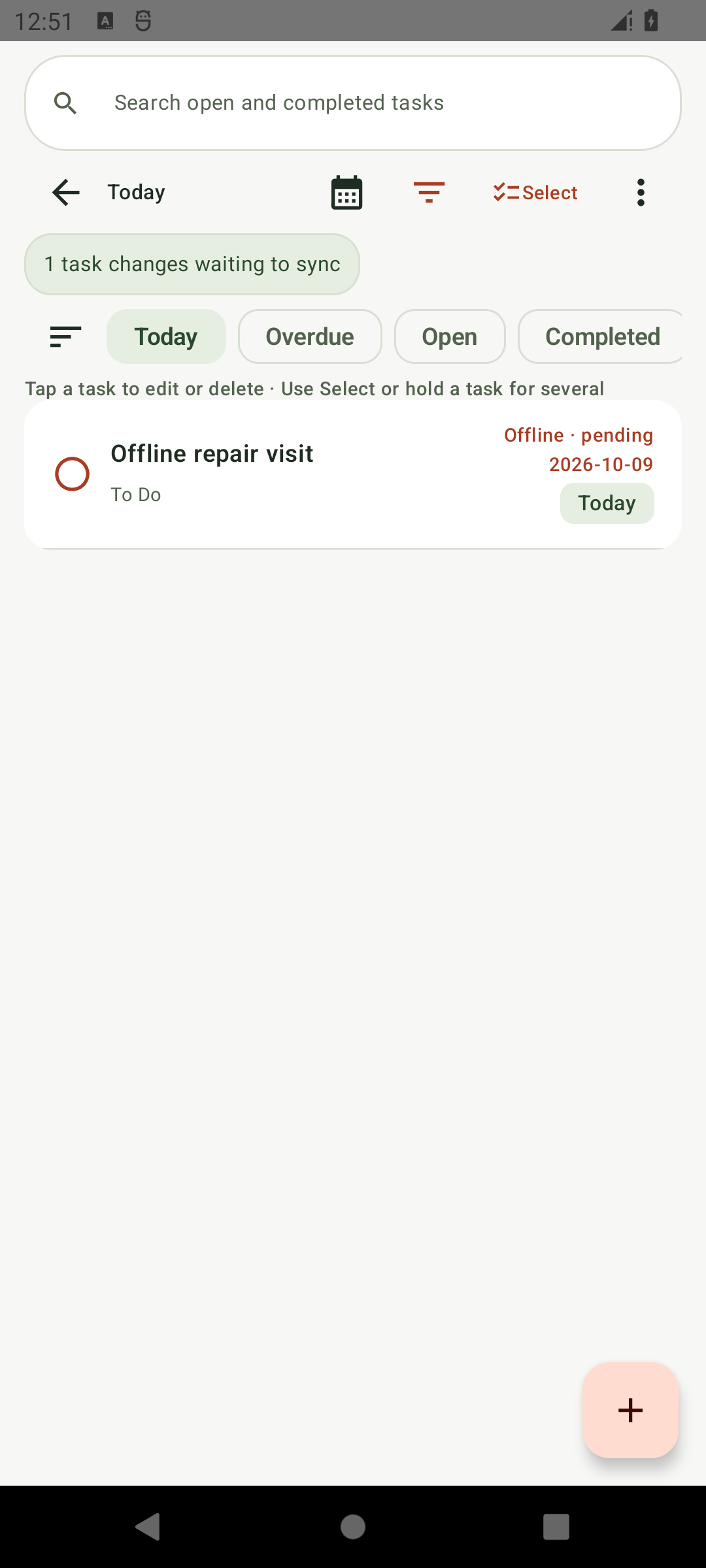
Offline repair visit showing a pending task waiting to syncView screenshot ↗
Keep working offlineVisible pending sync state
Calc net pricing editor with quantity, subtotal, VAT and total with item pricesView screenshot ↗
Review the numbersOdoo taxes & clear totals

07 / CONNECTED. PROTECTED.

Your work travels.
Your context stays yours.

Switch between named Odoo connections and companies. Open cached work quickly. Keep credentials, tasks and queued changes protected on the device.

01 / OFFLINE

Useful without a signal.

Read saved customers and tasks offline. Supported To-Do changes and job attachments are kept securely until they can sync. Review any conflicts when you reconnect.

02 / CONNECTIONS

The right business context.

Use an API key or username/password. Test before saving a profile. Select a company per connection; permissions, caches, recent records, favourites and queued tasks keep their profile and company context.

03 / SECURITY

Protection you control.

Saved credentials, business records and pending task changes are encrypted on your device. Secure connections, optional trusted-server settings, section locks and screenshot privacy controls help protect your information.

04 / ADMINISTRATION

Know what’s happening.

Review your access permissions, saved records and pending changes. Check synchronization issues, choose whether to share a support report, and clear saved records without deleting them from Odoo.

08 / FEATURE DIRECTORY

The big picture.
And the small details.

Find the tools for your day. Search across every workspace by workflow, product or action.

Trial, lifetime access & recovery 3 features
  • Start a 72-hour free trial after connecting to Odoo, with the remaining time clearly shown and no automatic charge.
  • Unlock lifetime access with a one-time Google Play purchase. See your local price before confirming payment.
  • Restore an eligible purchase or redeem a Google Play promo code using the account linked to your installation.
Overview, navigation & appearance 16 features
  • Choose a light or dark appearance, with clear contact cards and focused editing screens.
  • See outstanding invoices, overdue amounts, sales and profit from your business overview.
  • Search customers, products, quotations, sales orders and invoices from one place.
  • Return quickly to recent records and favourites for each Odoo connection.
  • Share Odoo documents as PDFs, or a clearly labelled app-generated summary where available.
  • Use Android’s Back action to return through your work without losing your place.
  • Enjoy a consistent BizNii design across your workspace.
  • Follow your device’s appearance or choose Light, Dark and optional Android dynamic colours.
  • Move between workspaces using clearly labelled bottom navigation.
  • Focus on the record you are editing with more space for the details.
  • Reach common actions from the Overview, with support for Android gesture and button navigation.
  • Return to your selected workspace and open saved customer information quickly.
  • Filter invoices and stock, and load more results as you browse.
  • Navigate Overview, To Do, Sales, Money and More; find additional tools in More.
  • Use wider list-and-detail views on supported larger screens, and open relevant records from widgets and notifications.
  • Review dashboard totals drawn from your connected Odoo business.
Customers, history & attachments 6 features
  • Browse your active Odoo customers.
  • Create and edit customer names, contact details and addresses.
  • Search, refresh and browse customer records, including previously saved records offline.
  • Call a customer, draft an email, open their address in maps or start a record discussion.
  • See a customer’s recent tasks, quotations, orders and invoices together.
  • Add, download and open photos or documents on supported records, with uploads up to 15 MB.
Products, quotations & sales orders 8 features
  • Browse products, prices and available stock for the selected company.
  • Create and edit single-variant products; manage multi-variant products in Odoo.
  • Prepare quotations, confirm sales orders and create draft invoices through Odoo’s workflow.
  • Apply company pricelists and quantity-based pricing, with margins shown when your permissions allow.
  • Review cancellation consequences before cancelling a quotation or order, and restore eligible documents to draft.
  • View tax-inclusive product prices while keeping quotation and invoice calculations aligned with Odoo.
  • Use Calc net to review quantities, taxes and totals. Keep an unfinished editor draft when rotating your device.
  • See units of measure, document status and currency clearly while working.
Invoices, payments & accounting 12 features
  • Create and edit draft customer invoices, then review before posting.
  • Find invoices by search or status, check amounts due and share PDFs.
  • Manage customer invoices, vendor accounting, receivables, payables, reports and statements from Money.
  • Review aged receivables in current, 1–30, 31–60, 61–90 and 91+ day groups.
  • Review aged payables and find vendor bills by supplier or due date.
  • Prepare payment-reminder emails and review them in your email app before sending.
  • Review and register payments against posted customer invoices using your configured Odoo journals.
  • Create a draft credit note from an eligible invoice, then review it before posting.
  • Search for the customer whose statement you need.
  • Share calendar-year profit-and-loss summaries and customer statements based on posted Odoo entries.
  • Review calendar-year bank, cash and VAT summaries. Open Odoo Accounting for Balance Sheet and statutory reports.
  • Share customer statements with company branding, account details, running balances and page numbers.
Inventory, deliveries & receipts 5 features
  • Check on-hand, forecast, incoming, outgoing, low and unavailable stock.
  • Filter delivery orders, review stock lines, reserve goods and complete supported transfers.
  • Follow incoming receipts and purchase references, including supported serial tracking and stock counts.
  • Look up products by barcode using your phone or a compatible hardware scanner.
  • Review interrupted or conflicting stock operations in Odoo before continuing.
Purchasing & suppliers 2 features
  • Search suppliers and purchase documents, edit draft RFQs and share available Odoo PDFs.
  • Review purchase confirmation, cancellation, receipts and draft vendor-bill creation within Odoo’s approval rules.
To Dos & calendar 8 features
  • Create, schedule, edit and complete tasks. Select several tasks to complete or delete them together, with confirmation for deletion.
  • Link a customer to a task, call or navigate to them, and start a prefilled quotation or invoice.
  • See your next appointment, find unscheduled tasks and check for overlapping appointments.
  • Set working hours and open the hourly calendar at the start of your working day.
  • Search open and completed tasks, view completion feedback and reopen work when needed.
  • Plan with Schedule, Day, 3-day, Week and Month views, including all-day appointments.
  • Set task durations, drag or resize in 15-minute steps, edit recurring appointments and copy or move supported calendar items.
  • Find overdue work, select multiple tasks and use colours to distinguish activity types or event tags.
Field work, warranties & van stock 4 features
  • Keep materials, repeat-task settings and travel time with a field task. Repeat tasks advance when completed in BizNii.
  • Look up warranties by serial number and share available certificates; unavailable expiry dates are marked clearly.
  • Share job-report PDFs, follow installation checklists and open your ordered appointments in a maps app.
  • Check van stock by location and prepare a draft RFQ for replenishment.
Discussion & team collaboration 6 features
  • Start Odoo direct or group chats, mention colleagues and discuss business records.
  • Share chat photos and files through Odoo. Sending private messages requires a connection.
  • Follow unread messages, Inbox and Mentions across your Odoo conversations.
  • Choose privacy and lock-screen settings to control how message details appear on your device.
  • Read previously saved internal notes offline. A connection is required to send new private-chat files.
  • Keep the notification and email preferences configured in Odoo.
Widgets, reminders & notifications 7 features
  • See your month, task colours, overdue work and completed tasks in the Android calendar widget.
  • Choose appointment warnings and overdue digests every 6 or 12 hours. Use Show overdue summary now in notification settings and expand the notification for available task details.
  • Receive appointment reminders, subject to Android permissions and battery settings.
  • Enable optional overdue-invoice and low-stock alerts that show counts without customer names or financial totals.
  • Read All, Inbox and Mentions in the Discussion widget, refresh it and open a conversation in the app.
  • Receive discussion notifications, with richer details on Android 11 and newer. Background checks may be delayed by your device.
  • Open available phone or email actions from appointment reminders, with private details hidden in the lock-screen public view.
Offline work, recovery & diagnostics 7 features
  • Read saved tasks offline and queue supported task changes, photos, signatures and documents for synchronization.
  • Search your saved tasks offline without mixing information between Odoo connections.
  • Review synchronization status and local diagnostics in Administration, and choose whether to share a support report.
  • Keep supported task changes and their attachments linked when synchronization completes.
  • See task lists, calendars, pending counts and widgets update after synchronization.
  • Recover supported pending tasks after a connection interruption; review the server result before repeating an uncertain action.
  • Keep pending task work associated with its original company and review any items needing attention.
Connections, companies & security 16 features
  • Save several named Odoo connections, with separate credentials and saved business data.
  • Connect using an Odoo API key or username and password.
  • Test your connection details before saving them.
  • Connect securely to your remote Odoo server using HTTPS.
  • Configure trusted certificates with your administrator for servers that need them.
  • Protect saved API keys and passwords with Android-backed encryption.
  • Keep saved business records and pending task changes encrypted on your device.
  • App-private business records are excluded from Android backup and device transfer; maintain Odoo server backups separately.
  • Connect to compatible Odoo 14–20 environments with the required API access.
  • Keep saved records separate for each Odoo connection and user.
  • See available tools according to your Odoo access rights and installed modules.
  • Review your connection, selected company and read, create and edit permissions in Administration.
  • Enable privacy mode to block app screenshots and recent-app previews.
  • Protect supported sections with biometrics or your device lock, choose when they relock and lock them immediately when needed.
  • Clear supported saved records without deleting Odoo records or your saved login details.
  • Restore saved workspace information for the matching Odoo connection and user.

Feature availability depends on installed Odoo modules, the connected user’s access and company configuration.

09 / BEFORE YOU CONNECT

A clear view of what’s supported.

What works offline?

Read previously saved customers and tasks without a connection. Supported To-Do changes and job attachments can wait to sync when you reconnect. Sales, stock, purchasing, accounting and private-message sending require an online connection.

Which Odoo and Android versions?

Android 8.0 or newer and a compatible Odoo 14–20 server, including supported Odoo Online and Odoo.sh environments. Your Odoo plan must allow external API access. Community editions have been tested. Enterprise-only modules and custom configurations need their own checks. Use username/password on Odoo 14–18; API-key sign-in requires Odoo 19 or 20. Test your connection before purchase; available tools depend on your modules, permissions and customisations.

Which financial reports are available?

Ageing shows balances as of today. App-generated profit-and-loss, bank, cash and VAT summaries support financial years ending 31 December. Check them against your Odoo accounts. Balance Sheet and statutory reports open in Odoo Accounting.

How are stock and product operations handled?

Review stock movements before confirming them. If a transfer is interrupted or needs attention, check its status in Odoo Inventory before continuing. Manage multi-variant product editing in Odoo.

Are notifications instant?

Discussion messages are checked periodically, usually around every 15 minutes. Android battery settings and connectivity can delay alerts. Appointment reminders require the relevant Android permissions. Sending private messages requires a connection.

How do the trial and lifetime purchase work?

Start an optional 72-hour trial after connecting to Odoo. It does not automatically charge you. Lifetime access is a separate one-time Google Play purchase, with no subscription. Google Play shows the price and applicable taxes before confirmation. Restore uses the Play account associated with this installation. Promo redemption and ownership updates can take time; return to the app and use Restore purchase. Pending purchases do not grant lifetime access. Odoo hosting and third-party services are separate.

Is BizNii an official Odoo app?

BizNii for Odoo is an independent native Android client. Your records stay in Odoo. No additional BizNii server module is required. Your Odoo hosting plan must allow the required external API access; check this with your provider. Odoo is a trademark of Odoo S.A.

HELP SHAPE WHAT COMES NEXT

Interested in trying
BizNii for Odoo?

Join our Early Access programme, tell us which Odoo version you're using, and get the chance to help shape the application before launch.

YOUR WORKSPACE. YOUR WAY.

Your Odoo workspace.
Ready for your day.

Keep your customers, tasks, documents and team connected in one focused Android app for Odoo.

Try the app for 72 hours with no automatic charge. Lifetime access is a separate one-time Google Play purchase. The price and applicable taxes are shown by Google Play; Odoo hosting is not included.

Android 8.0+Odoo 14–20No subscription
BizNii for OdooLIFETIME ACCESS

Google Play

One payment. No subscription. Purchase and restore lifetime access through Google Play from within the app.

Setup & support ↗

Independent software. Informed use.

BizNii for Odoo is independent software. Users should maintain regular Odoo backups and verify critical business information. Application operation and synchronization may be affected by third-party systems and connectivity. Please review our Terms of Use and Disclaimer.